
Complete Every Contact With B2B Data Enrichment
Upload your CSV and we add work emails, secondary emails, phone numbers and company data to every contact we can find, matched by LinkedIn URL or by name and company. One credit per enriched row.
How It Works
From upload to enriched file in four steps
Upload
Add a CSV with a LinkedIn URL, or a name and company.
Match
Pick a match mode and map your columns.
Enrich
Choose the fields to append; Kipplo fills them in.
Download
Download the enriched CSV, plus a notification to your registered email id.
The same enrichment, straight from your stack
Developers can call the Kipplo data enrichment API directly.
CSV Enrichment
Enrich a whole CSV in one pass, up to 500k rows
Add your CSV file to the upload area, then tell us what each row must have. For work email, secondary email and phone, pick Must have, If available or Skip. Kipplo reads your columns for you and keeps every original field in what you download.
- Up to 200 MB · 500,000 rows · 100 columns per file
- Your original columns are always preserved
- Clear warning to de-duplicate first; repeats are billed separately
- Not sure of the format? A built-in “See a sample” shows the ideal file
- Decide what each row must have, right on the upload screen
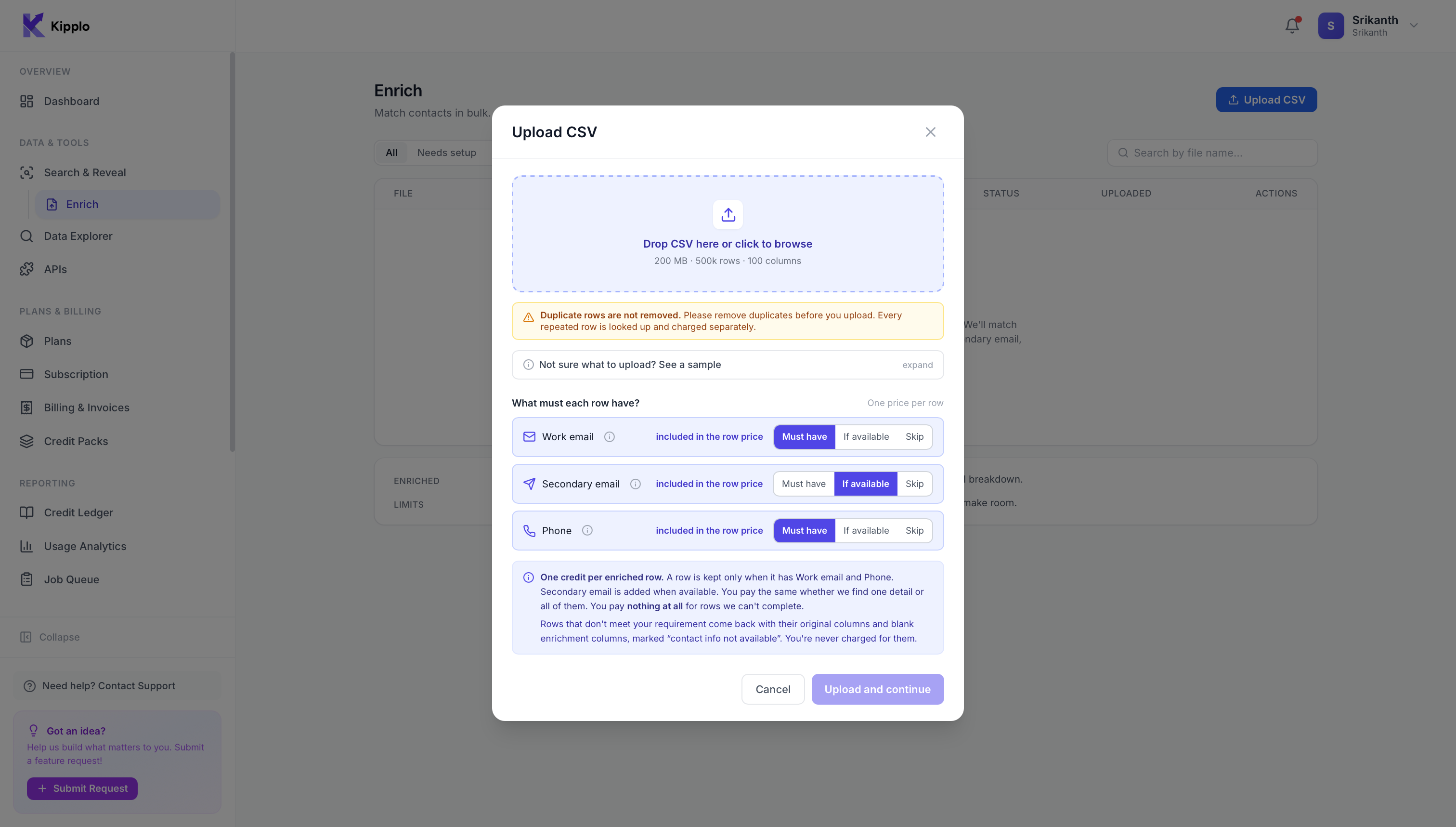
For each detail, pick one:
- Must haveKeep the row only if we find it.
- If availableAdded when we find it. Never drops the row.
- SkipNot looked for at all.
One credit per enriched row, whatever we find. Rows we can't complete use no credits and come back marked “contact info not available”.
Two Match Modes
Match by LinkedIn URL or name + company
LinkedIn URL
Most accurateAdd LinkedIn profile URLs and Kipplo looks up each contact directly.

Name + Company
Use full name or first + last, and company by name or domain.

Guided Setup
Column mapping, handled for you
Whichever mode you choose, Kipplo maps your columns and validates the file before a single credit is spent.
Auto-detected mapping
Kipplo reads your CSV file’s headers and presents them for selection, so you only map columns that actually exist.
Sample preview
Preview the first five rows of any column to confirm the mapping before spending a credit.
Built-in validation
Enrichment stays off until every required column is mapped, so you never spend credits on a misconfigured run.
Email & Phone Enrichment
Append verified work emails and phone numbers
Work email, secondary email and direct-dial phone all come in one price. Every enriched row costs one credit, whether we find one detail or all three.
1
credit per enriched row
Not per field. Never more.
- Work emailIncluded
- Secondary emailIncluded
- PhoneIncluded
One detail or all three. An enriched row costs one credit, whatever we find on it.
Missing = no credit. A field we can’t find never deducts a credit.
You set the rules. Mark each detail Must have, If available or Skip.
See the math on a 500-row run
What a 500-row file costs
A sample of 500 unlocked B2B contacts with Kipplo, with each detail set to If available. One credit per enriched row, nothing more.
Run Summary
500
Rows in your upload file
350
Rows matched · 70%
Total charged for this run
350 enriched rows × 1 credit · unmatched rows cost nothing
350 credits
Breakdown
Found 300 verified work emails
out of 500 rows
Found 200 secondary emails
out of 500 rows
Found 300 direct phone numbers
out of 500 rows
350 enriched rows
billed 350 × 1 credit
Company & Contact Data
34+ B2B data points on every match
Contact data enrichment and company data enrichment in one pass.
- Contact, Person, Company, and Location data groups
- One credit per enriched row covers email and phone
- Firmographics like job title, industry, headcount, and location, included at no extra credit
- Select-all or none per group, collapse groups, trim your output file
- Contact3All selected
- Person6All selected
- Company17All selected
- Company Location5All selected
- Person Location3All selected
What You Get Back
Every enriched contact, fully profiled
Click any group to see all of its fields.
Contact
3 fields
Person
6 fields
Company
17 fields
Company Location
5 fields
Person Location
3 fields
Plus 2 metadata columns on every job: match_status and match_method so you always know how each row was resolved.
Job Management
Run, track, and revisit every job
A processing queue handles your CSV files automatically, and every job stays on record with a full breakdown you can reopen any time.
- Filter by state
Every job, whatever its state.
- Per-job detail panel with rows, matched, credits, match method, and timestamps
- Search by file name across your history
- Get an email when the job finishes, per-job or account default
Enrich
Match contacts in bulk. Charged only for what gets enriched.
| File | Rows | Enriched | Credits | Status |
|---|---|---|---|---|
| q4-inbound-leads.csv | 4,820 | — | — | Running |
| apac-webinar-signups.csv | 2,150 | — | — | Running |
| hubspot-contacts-export.csv | 12,340 | — | — | Running |
| linkedin-prospects-batch-02.csv | 579 | — | — | Setup incomplete |
| q3-inbound-leads.csv | 4,820 | 3,712 (77%) | 3,712 | Completed |
| partner-referrals-q3.csv | 310 | — | — | Failed |
Frequently Asked Questions
One credit per enriched row. Work email, secondary email and phone are all included in that credit, so a row costs the same whether we find one detail or all three. You decide what each row must have (Must have, If available or Skip).
You are not charged. Unmatched rows, contact-info-not-available rows, and lookup errors all stay free. You only spend a credit on rows we complete the way you asked.
Three match methods are supported: LinkedIn URL (the strictest match), first name + last name + company, or first name + last name + website. Mix and match across rows — every row is matched the strictest way its columns allow.
Up to 200 MB, 500,000 rows, and 100 columns per file. You can have up to 3 enrichment jobs running at once and 10 setup-incomplete uploads waiting in your queue.
Yes. Duplicate rows are not removed by Enrich — every repeat row is looked up and billed separately. Dedupe in your CRM or spreadsheet first to avoid spending credits on the same person twice.
Each completed job has a Download enriched CSV button in the Enrich dashboard. Your original columns are preserved and the appended fields are added alongside. You can re-download anytime — no need to keep the upload tab open.
Yes. Enrich pulls from the same Kipplo data network as the rest of the platform — ethically sourced from public and licensed providers, with GDPR and CCPA opt-out handling.
Not currently. Enrich is focused on person-level contact enrichment (email and phone). If you need firmographic enrichment for company records, use the Kipplo API or Data Explorer instead.
Start enriching your B2B data
Upload a CSV with a LinkedIn URL or a name and company, and see your match rate before you spend a credit. One credit per enriched row.